Is Kalodata accurate, and how any TikTok sales estimate is made
Is Kalodata accurate? The yes or no is not the useful part. Three questions are: which window a TikTok Shop sales figure was read over, how old the reading is, and whether it has enough history.
Published · 5 min read
In this post8 sections
- How does a sold counter become a sales number?
- What tells you whether you can act on it?
- Why does a good tool show no number at all?
- Why do two tools disagree about the same listing?
- How do you test any tool's number yourself?
- What can no estimate of this kind tell you?
- Read the method before you trust the next number
- Questions
In short
You can tell whether a TikTok Shop sales number is reliable by asking three questions: the window it was measured over, how old the reading behind it is, and whether it had enough history to be a figure at all. Run that check on any estimate, from any tool, and the answer to "is Kalodata accurate" becomes something you decide, not something you take on faith.
You can tell whether a TikTok Shop sales number is worth acting on by asking it three questions: which window it was read over, how old the reading behind it is, and whether it had enough history to be a figure at all. Ask them, and the phrase "is Kalodata accurate" stops being a yes or no you take on faith and becomes a check you can run on any listing and on any tool. Acting on a number you cannot place is how a seller changes price on somebody else's guess.
Every sales estimate that starts with TikTok's public sold counter is only as good as the method that reads the counter and labels the result. SoldCount's own method is public, and one page answers those three questions: methodology.
How does a sold counter become a sales number?
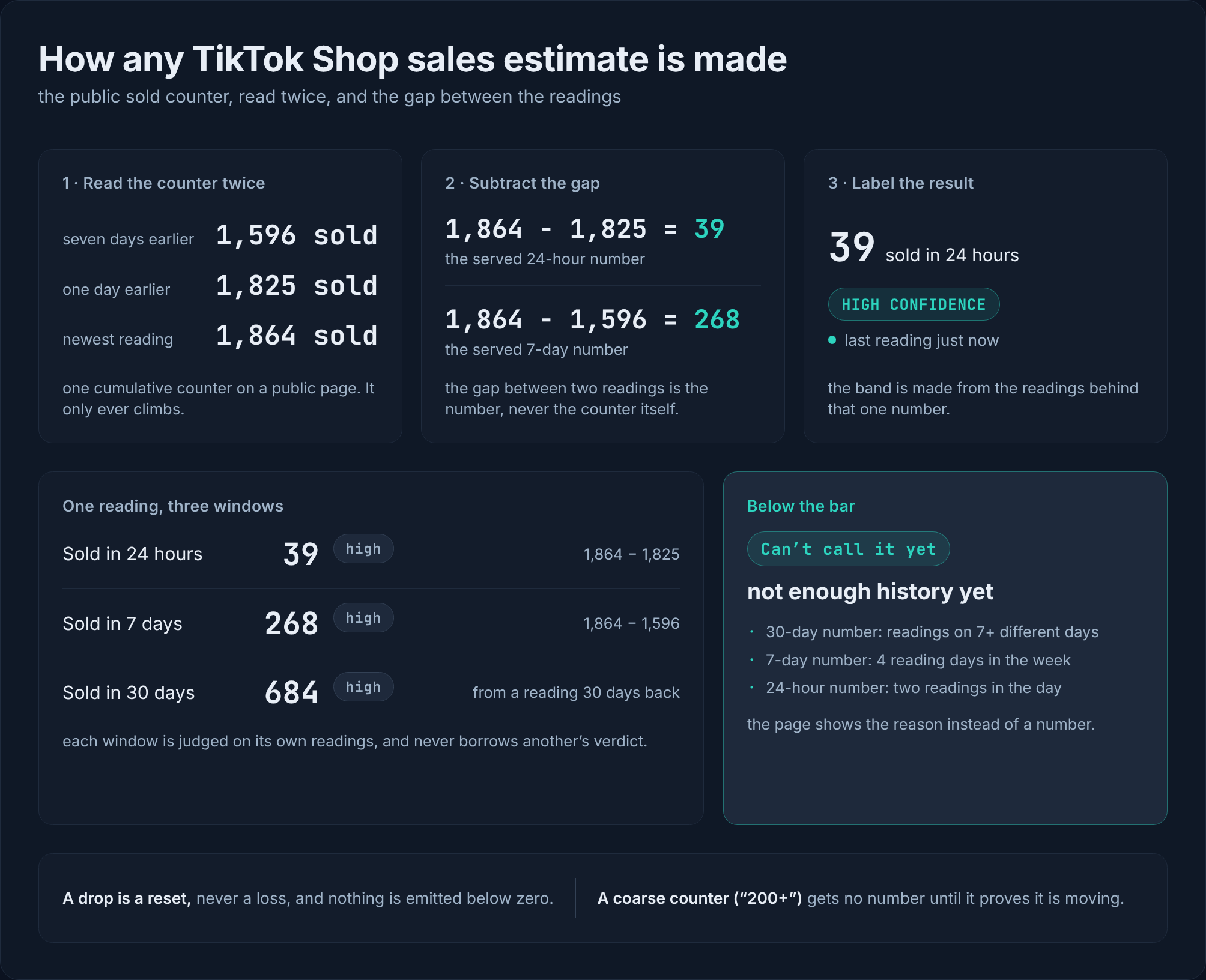
TikTok shows a running total on a listing page, a cumulative counter that only ever climbs as the listing sells. A tool reading that page sees the counter, never what the shop itself records. I subtract the older reading from the newer reading to find what sold in between. The counter is never added up: summing a running total would report the same sales many times over.
A day without a reading is a gap in the series, not a zero. A drop means the listing was relisted, reset, or had its options merged. The drop counts nothing, and counting restarts from the lower figure.
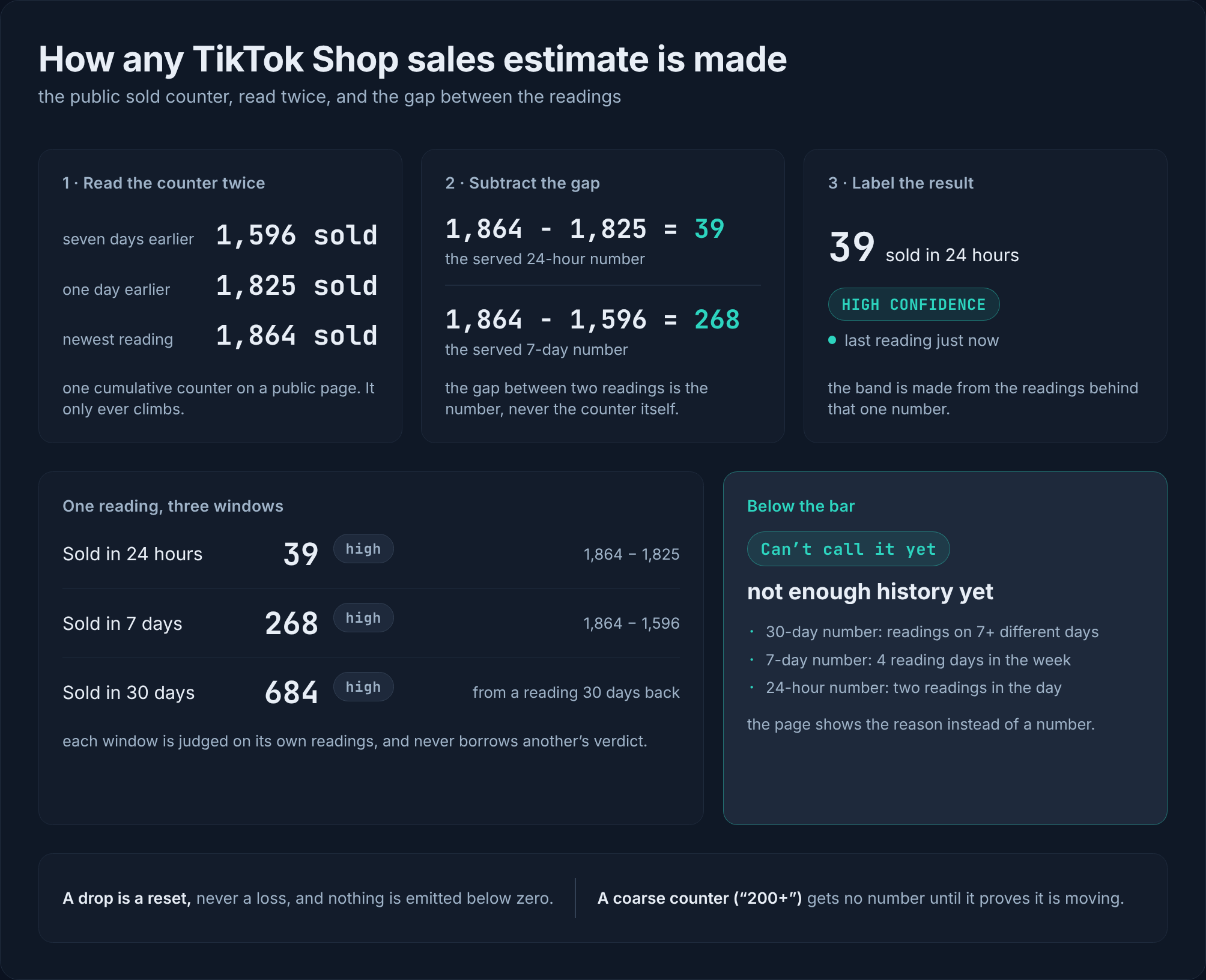
Every window is one subtraction from the newest reading. Subtract the reading from a day earlier and the difference is the 24-hour figure; subtract the reading from a week earlier and it is the 7-day figure; the 30-day figure is the same difference taken across the readings inside a month.
The picture below works through those subtractions on a listing SoldCount tracks in its own demo account: the figures beside each window are the ones the product served for it, each with the label the product puts on it.
That is the extent of the arithmetic. The rest is labelling.
What tells you whether you can act on it?
I label each number with three things.
Confidence band, high, medium or low. High means the reading is from within the last day, with no recent listing reset, and the counter's step is no more than a twentieth of the number; a 30-day figure also needs about two weeks of reading days. Medium is a reading within about three days and a step no more than a quarter of the number, and about a week of reading days for a 30-day figure. Low is thinner data that still clears the bar. The label is made for that one figure, so two listings can carry the same number at different bands.
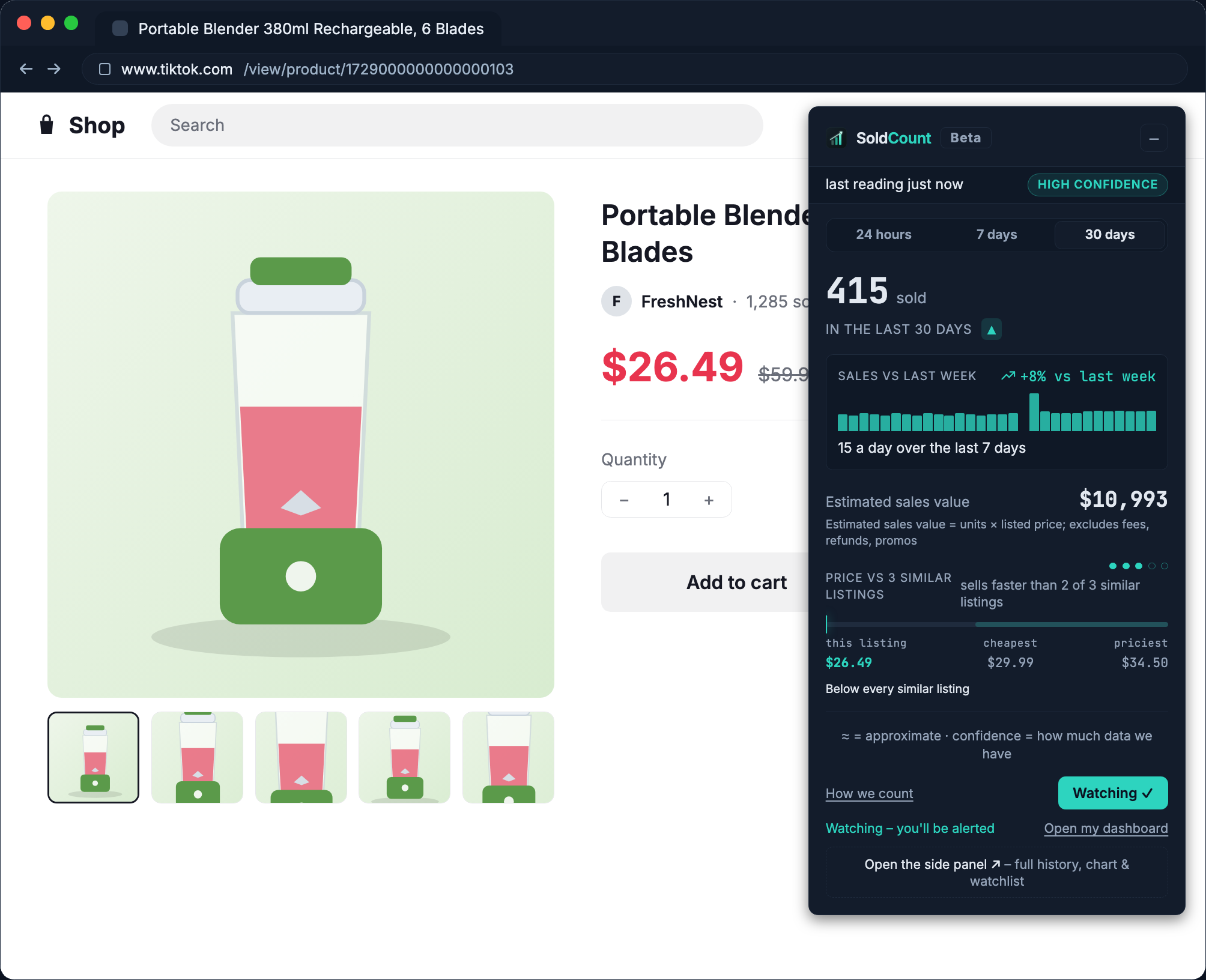
Freshness stamp, how old the reading is: "last reading 4h ago", or "last reading just now" when you opened the listing yourself. Past about a day the stamp turns amber, because a stale reading hides a move that already happened.
Each window's own bar. The 30-day number needs readings on at least 7 different days, spanning at least 7 days, inside a 30-day lookback. The 7-day number needs 4 reading days in that week. The 24-hour number needs two readings inside the day itself. No number borrows another window's verdict.
Why does a good tool show no number at all?
If there are not enough readings to meet the bar, the screen shows the reason instead of a guess. The verdict pill reads "Can't call it yet" and the prose says "not enough history yet."
Small counters are coarse. A listing can display "200+", meaning at least 200. A coarse step is treated as a floor, not a reading, and no sales are inferred until two consecutive rises prove the counter is actually moving.
A figure that arrives with no confidence label, no age stamp, and no reason when data is thin deserves your wariness, whichever tool serves it.
Why do two tools disagree about the same listing?
The plain reasons two numbers differ: a different window, and a 24-hour figure painted as a weekly one looks very different; a different start date, so the same window holds a different span of readings; and a counter drop that one of them counted as sales, which inflates a number with units nobody bought.
I have not verified how any other tool reaches its number. This post does not claim to. Kalodata's own public description, as Dashboardly reported it in November 2025, says its estimates can differ from actual transactions. That is the honest position of any estimate built this way: a public counter is not what the shop records, and nothing reading it from outside can promise a match.
So the same three questions apply to any tool, this one included: which window, how old, and enough history?
How do you test any tool's number yourself?
Note the public counter on a listing today. Note it again tomorrow. The difference is what sold in between. The check has its own limits: a coarse counter may not move visibly in a day, a reset in the middle ends the stretch, and a cumulative counter with no earlier note tells you nothing about last week.
I re-read watched listings about every 6 hours, so the check is done for you. The arithmetic is identical.
What can no estimate of this kind tell you?
- Profit, fees, or any P&L. A money figure is estimated sales value (units × listed price), never revenue.
- Real inventory. The public page does not publish stock.
- Ads or attribution. The page does not say which traffic brought the sale.
- Creator or affiliate data.
- Compliance insight or account-health score.
- Any repricing or write to a shop.
Read the method before you trust the next number
The method and the refusals are published on the methodology page, every figure carries its label and its age, and the receipts are the readings behind it. So read the method rather than believe this post. Then open one rival listing and put it on watch: free early access, read-only, no seller login, and nothing in your shop changes.
Questions
- How does a "sold" counter become a number of sales per day?
- I subtract the older reading of the public "sold" counter from the newer reading; the difference is what sold in between. The counter is never summed up.
- How often is a listing re-read?
- About every 6 hours, and that interval is a setting rather than code. Opening the listing in the Chrome extension takes a reading right away, and every figure shows its age.
- What does the confidence label on a number actually mean?
- High means read within the last day, no recent listing reset, and the counter's step no more than a twentieth of the number. Medium is a reading within about three days and a step no more than a quarter of the number. Low is thinner data that still clears the bar.
- Why does it sometimes show no number at all?
- Each window is judged on its own readings. The 24-hour number needs two readings in the day, the 7-day number needs 4 reading days in that week, and the 30-day number needs 7 reading days spread over at least 7 days inside a 30-day lookback. Below the bar you get the reason, not a guess.
- Why is its figure different from another tool's estimate?
- A different window, a different start date, or a counter drop one of them counted as sales. I have not verified how any other tool reaches its number. Kalodata's own public description, as Dashboardly reported it in November 2025, says its estimates can differ from actual transactions.
- What does it NOT do?
- No profit, fees or P&L, no real inventory count, no ads or attribution, no creator or affiliate data, no compliance call, and no repricing or write to a shop. A money figure is estimated sales value, never revenue.