TikTok Shop API for sales data: build your own agent on SoldCount
One endpoint, one key, 25 tools. Give your own agent the TikTok Shop sales figures, and let it do the morning check while you sleep.
Published · 14 min read
In this post11 sections
- What this gets you that asking an assistant does not
- 1. Get a key
- 2. Point your agent at SoldCount
- 3. Copy this prompt to set it up
- 4. Give it a morning check
- What you can ask it
- Seven questions, and the one call each one takes
- When you tell it to change something, four things can come back
- Five things worth building
- 1. The morning check, on a schedule
- 2. Watch twenty links in one go
- 3. Hear about an undercut when it happens, not when you ask
- 4. Decide once how big a change is worth interrupting you
- 5. Put the figures where you already work
- The budgets
- What it will not do
- Hand it the rest in one file
- Questions
In short
SoldCount runs an MCP server at https://mcp.soldcount.com/mcp. Point your own agent at it with a key, and it gets 25 tools over the TikTok Shop listings you watch: 17 reads and 8 writes, 600 reads an hour, no model call anywhere in them. The difference from asking an assistant a question is that an agent has your files, your scheduler and your Slack, so the answer can land somewhere at 6am without you typing anything.
The TikTok Shop API is for your own shop. It will not tell you how fast a rival's listing is selling, because TikTok does not owe you that and never has.
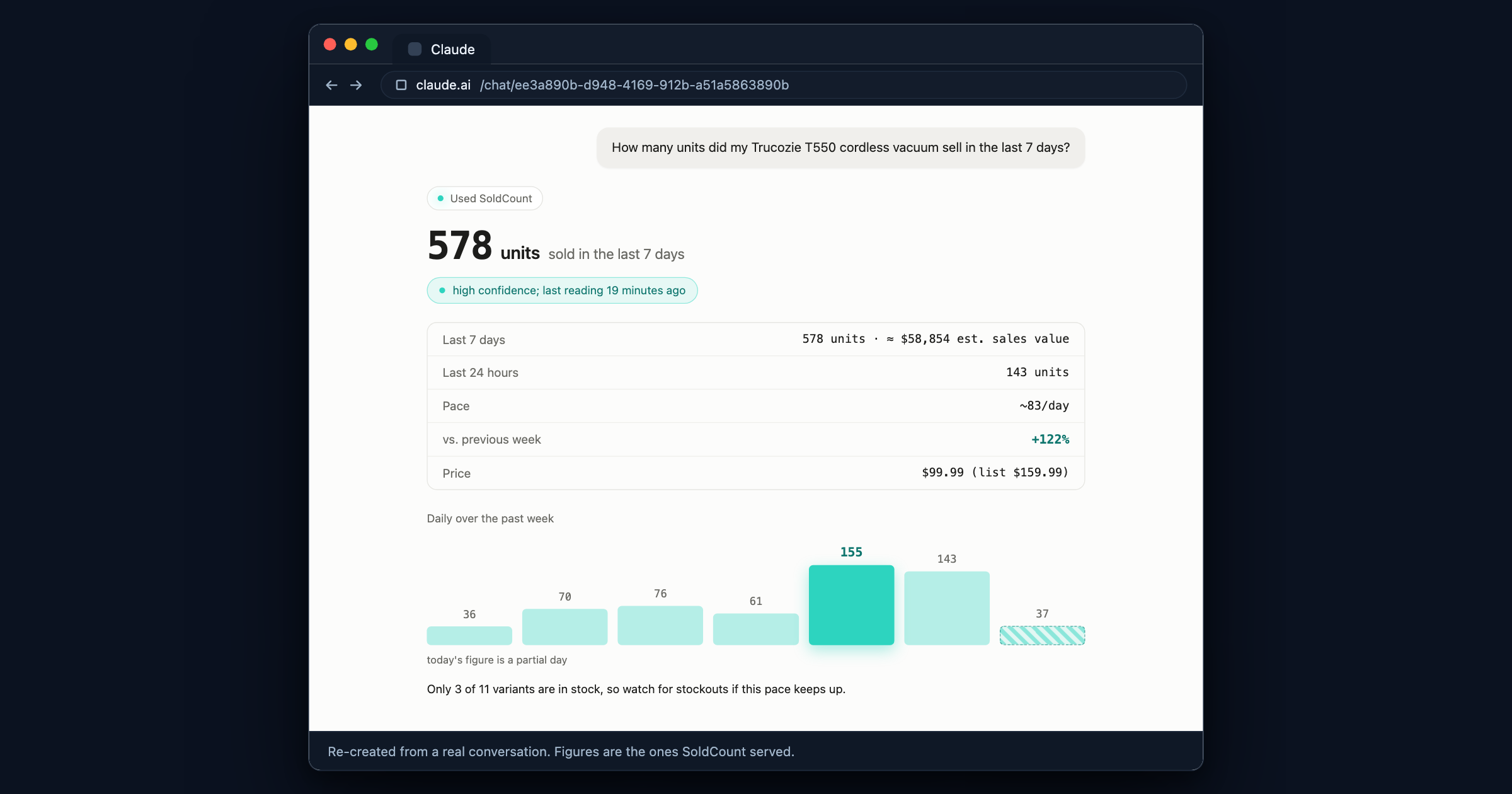
SoldCount reads the TikTok Shop listings you watch about every 6 hours and counts what sold between one reading and the next. Sales are the rises of TikTok's sold counter between our readings. A drop means the listing was reset, and we start counting again from there.
All of it is behind one HTTPS endpoint, and your own agent can have it.
What this gets you that asking an assistant does not
If you want to ask questions and read answers, connect SoldCount to Claude and stop here. That takes two minutes and it is the right tool for a question.
An agent is for the thing you do every morning. It has what a chat window does not: your filesystem, your scheduler, your spreadsheet, your Slack. So the answer does not have to wait for you to ask. It can be a file on your disk at 6am, or a message in a channel, or a row appended to the sheet you already keep.
1. Get a key
In SoldCount: Automations, then Connect your AI assistant, then Access keys, then Generate key.
The key starts sc_ and is shown once. SoldCount stores only a hash of it, so copy it straight
away. There is no way to show it to you again, and that is on purpose.
Under each key is a switch, Let it act on its own. A new key starts with it on, which means the key can make changes in SoldCount, never on TikTok. Turn it off and that key can only read. It is per key, so the agent that writes your morning file can be read-only while a second key does the watching.
To take access away, revoke the key on the same screen. The next call fails. Nothing is cached and nothing needs restarting.
2. Point your agent at SoldCount
a.Claude Code(one line)
claude mcp add --transport http soldcount https://mcp.soldcount.com/mcp \ --header "Authorization: Bearer sc_your-key-here"b.Claude Desktop, Cursor, or any client with an MCP config
{ "mcpServers": { "soldcount": { "type": "http", "url": "https://mcp.soldcount.com/mcp", "headers": { "Authorization": "Bearer sc_your-key-here" } } } }c.An older client that can only start a local command
Bridge it with
mcp-remote:npx -y mcp-remote https://mcp.soldcount.com/mcp \ --header "Authorization: Bearer sc_your-key-here"
Nothing is kept open between you and us, so closing your laptop, restarting the agent or losing your connection breaks nothing: the next call simply works. Your key is read on every request, which is also why revoking it takes effect on the very next one.
If your client speaks the MCP sign-in flow, you can skip the key entirely and add the endpoint with no header. That is the right answer for a person at a keyboard. A key is the right answer for a script with nobody at one.
3. Copy this prompt to set it up
Paste this into Claude Code with your key in place of {{KEY}}. It checks what you already have,
connects, teaches the agent SoldCount's rules, and tells you what to do next.
Tested in Claude Code on 2026-10-02 against a local SoldCount server. The lines here differ from that run only in the address and the install scope, and the odd-looking parts are there because of what happened when it ran.
Set up SoldCount for me in Claude Code, so you can read how my TikTok Shop listings are selling.

My SoldCount access key: {{KEY}}
Use it only in the command in step 2. Do not repeat it back to me or save it anywhere else.

1. Check first. Run `claude mcp list`. If a server there already points at mcp.soldcount.com, or you already have SoldCount tools in this session (a "claude.ai SoldCount" connector from my Claude account counts, and it can show up a few seconds late), SoldCount is already connected: tell me its name and ask whether to replace it before you change anything. Two SoldCount connections show every tool twice.

2. Connect. Run:
   claude mcp add --scope user --transport http soldcount https://mcp.soldcount.com/mcp --header "Authorization: Bearer {{KEY}}"
   Then run `claude mcp list` again and check that soldcount says Connected. If it failed to connect, stop and tell me: the key may have been deleted on the SoldCount page.

3. Learn how SoldCount works. Download https://soldcount.com/soldcount-agent.md and save it as ~/.claude/skills/soldcount/SKILL.md, with these four lines added at the very top:
   ---
   name: soldcount
   description: How to read and act on the seller's SoldCount data (TikTok Shop sales, prices, rivals, alerts). Use whenever the seller asks about their listings, their rivals or SoldCount.
   ---
   Read it once now and follow it from here on.

4. Finish. Tell me in two short sentences what you set up. Then tell me that Claude Code loads a new connection only when it starts, so I should type /exit, run `claude -c` to come back to this conversation, and ask: "What am I watching, and what moved this week?"
Why each step reads the way it does, since none of it is decoration:
- Step 1 asks before it changes anything because you may already be connected, through the
directory connector or a key from last month, and a second connection makes every tool appear
twice. On the test run this is exactly what happened: it found the existing connection, named it
and stopped. The clause about a connector showing up "a few seconds late" is there because one
did, appearing only in the second
claude mcp list. --scope userso SoldCount works in whatever folder you open Claude Code in, not just the one you set it up from.- Step 3 installs the instructions as a skill, which is the same file this page points an agent at. After this, later sessions know SoldCount's rules without you pasting anything again.
- Step 4 names the restart because it is required, not polite. A connection added mid-session is not usable in that session: we checked, and the assistant could not see the new tools until a new process started.
If the key is wrong or has been deleted, claude mcp list says
✘ Failed to connect with an HTTP 401, which is the case step 2 tells it to stop on.
Copy it from the block above. It is the whole setup, so there is nothing else to fetch.
4. Give it a morning check
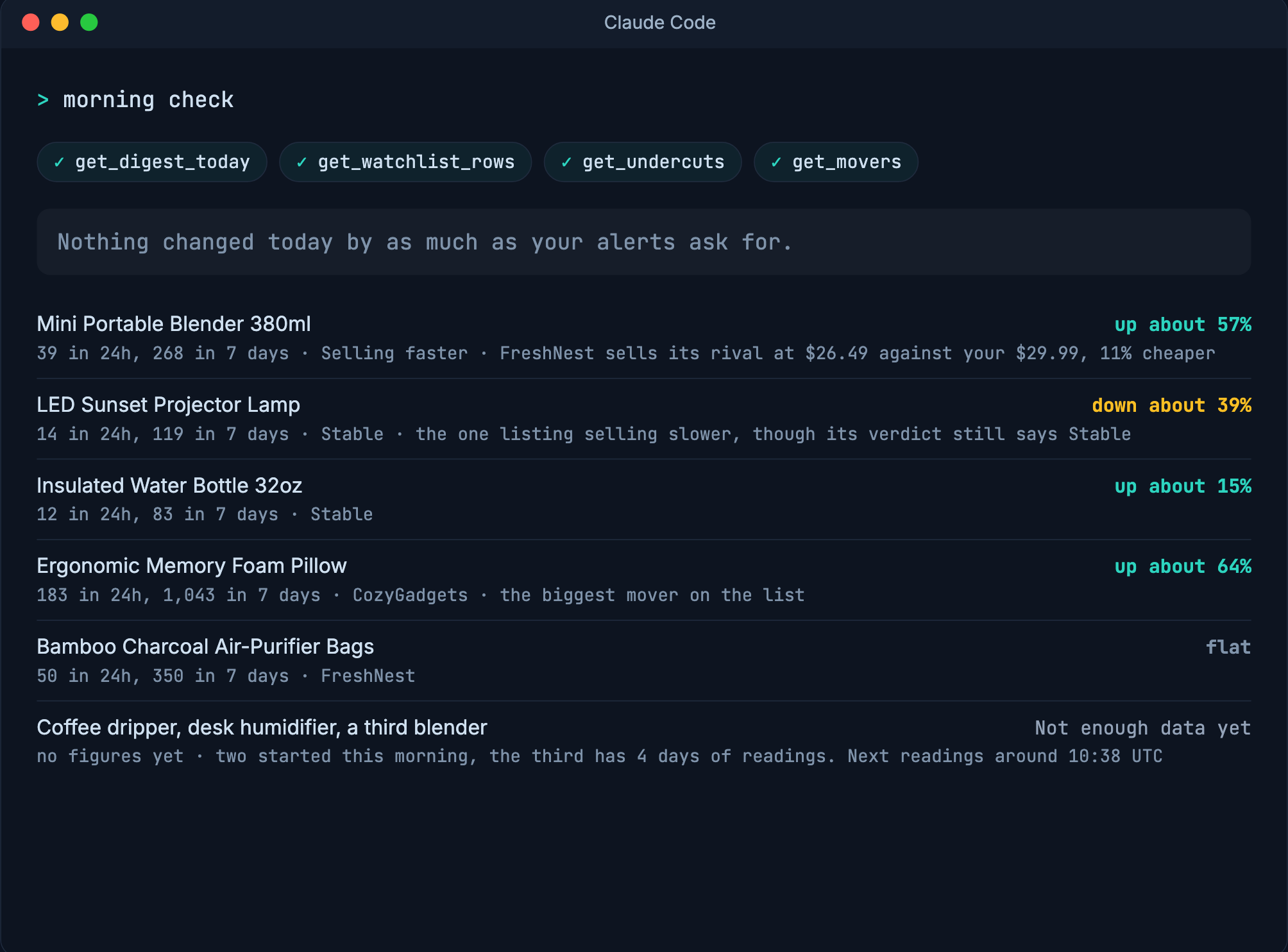
Once it is connected, this is the job worth having. Paste it once and it is saved as a skill, so every later session knows what you mean by "morning check":
Whenever I say "morning check", read my SoldCount data and write me at most six lines.
Save this instruction as a skill at ~/.claude/skills/morning-check/SKILL.md, the way you
saved the SoldCount one, so later sessions and scheduled runs have it too.

Use get_digest_today for what changed in the last 24 hours, get_watchlist_rows for where
every listing stands, get_undercuts for anyone selling the same product cheaper than me,
and get_movers for what is selling faster or slower than last week.

Lead each line with the listing, then the figure, then what you would do about it.
Where SoldCount returns a reason instead of a number, give me that reason in its own
words and move on. Never fill a gap with an estimate of your own, and never state a
figure SoldCount did not return.

Ask me before any write.
The last three sentences are the ones that matter. SoldCount refuses a figure it cannot stand behind and returns the reason instead, and an agent is only as honest as the instruction you gave it. What a refusal looks like, and why it is the right answer.
What you can ask it
Twenty-five things, and seven of them cover almost everything you will ask. What matters is not the list but where the judgement sits: SoldCount hands over measured facts and says plainly when it has none, and your agent does the thinking out loud. We used to write the verdict for you and stopped on 2026-09-29, because a verdict written by us is one more thing you have to trust. A figure you can check is not.
Nothing here runs a language model on our side, so no question you ask costs you a model call and no answer is a guess dressed as a number.
Seven questions, and the one call each one takes
| What you want to know | What comes back | The call |
|---|---|---|
| How is everything doing? | Every listing you watch with its figures beside it: sold in 24 hours, 7 days and 30 days, price, the week's price move, and whether it is selling faster or slower than last week | get_watchlist_rows() |
| What moved this week? | The same listings in order of how much they sped up or slowed down, and the ones that could not be ranked, each with the reason | get_movers() |
| Is anyone cheaper than me? | The listings of yours that a rival is currently selling the same product cheaper than, deepest cut first | get_undercuts() |
| Tell me everything about this one | One listing whole: shop, category, price, the three sold windows each with how sure we are and when it was last read, the direction against last week, pace, stock, and the price range for similar listings | lookup_product(id) |
| What changed since yesterday? | Today's summary of what moved, each line naming the alert behind it | get_digest_today() |
| Is anyone copying me? | Listings that look like one of yours, with the words behind each match | get_copycats(id) |
| Does this category still have room? | A verdict with the three measurements behind it, or a plain refusal with the reason | get_category_entry_window(id) |
Each of those is one call, which matters because it keeps your morning check to four calls rather than one per listing.
When you tell it to change something, four things can come back
Your agent can start and stop watching listings, label them, set how big a change is worth an alert, and silence one for a while. The question you actually care about is whether the thing happened, and there are four answers, not two:
- It is done. In your history, and there is no undo. An agent that offers to undo something is making that up, so be as careful as you would be clicking the button yourself.
- It is accepted but not done yet. This one only happens when you point it at a listing nobody has ever read. The slot is yours, the reading is coming in a few minutes, and the listing will not appear on your watchlist until it lands. So if you look straight away and it is not there, nothing has gone wrong.
- It is waiting for you. You flagged that kind of action for approval, so a card is sitting on your Automations screen and nothing has happened yet. This is normal, not a failure, and the only action set up this way to begin with is asking for a listing to be read sooner than usual.
- It was refused. A limit stopped it, and the refusal says which bound and what the number is, so your agent can pick a value that works instead of guessing. Nothing changed.
The one to watch for is the second. It is the only case where a confident "done" would be wrong, and it is why the answer has four shapes rather than two.
No tool here reaches TikTok. The eight writes change your own SoldCount workspace and nothing
else.
Five things worth building
1. The morning check, on a schedule
Section 4 gives you the check, and saves it as a skill so a fresh session knows it. The thing worth building is the part that runs it without you: a cron entry, a launchd job, whatever you already use, calling it headlessly and keeping the answer.
claude -p "morning check" >> ~/morning.txt
Four calls a day against a budget of 600 an hour is nothing, and this is the one that pays for the setup.
2. Watch twenty links in one go
Hand the agent a list of TikTok Shop links and let it call watch_add on each. watch_add takes a
full TikTok Shop listing link or a TikTok product id, not just a SoldCount id, so there is nothing
to look up first. A short vm.tiktok.com link is refused: open it once and paste where it lands.
A listing SoldCount already holds starts being watched on the spot. A listing nobody has ever read takes about six minutes, because we have to go and read the page before there is anything to watch. Until that first reading lands it is accepted but not on your watchlist, which is why the answer in the clip below counts twenty accepted beside zero watched.
What that means in practice: paste your links, go and do something else, and they are all there when you come back. Each one holds one of your 100 slots from the moment you ask, including the ones still waiting, so twenty links costs twenty slots immediately rather than in six minutes. At the limit the refusal tells you how many you have used.
3. Hear about an undercut when it happens, not when you ask
A rival cutting under you at 2pm is worth knowing at 2pm. Your agent can hold a line open and be told, instead of asking "anything new?" every ten minutes and finding out on the next check.
subscribe_events opens that line, get_subscription_events collects what has arrived, and
unsubscribe_events closes it. You can have 8 open at once.
What it means for you: each collection hands over only what you have not already seen, so a dropped connection never replays yesterday's alerts at you and never silently skips one. You do not have to keep track of where you were.
4. Decide once how big a change is worth interrupting you
Three things can earn an alert: somebody pricing under you, a price moving, and sales jumping. You
set how big each has to be, across every listing at once, with threshold_set.
There are floors: 10% for an undercut, 3% for a price move, 2x for a sales jump. Ask for something smaller and it is refused rather than quietly rounded up to the floor, and the refusal tells you the bound. That matters because the alternative is worse: you would think you were being told about 2% price moves, and you would not be.
5. Put the figures where you already work
One get_watchlist_rows call carries every row's figures. Write them to a CSV, append them to the
sheet you already keep, post the three that moved into a channel. Ask for get_watchlist_rows once
rather than lookup_product on every row: it is one call against your budget instead of one per
listing.
This is the one a browser cannot do for you. Asking a question gets you an answer you have to read; this gets you a row in the sheet you already keep, which is where the decision actually gets made.
The budgets
Per account, per hour. Every key and every sign-in on the account shares them.
| What | Budget |
|---|---|
| Reads | 600 an hour |
| Writes | 60 an hour |
| Alert streams open at once | 8 |
| Listings watched | 100 by default |
You will not meet these in normal use. A morning check is four calls against 600, so the only way to find the ceiling is to loop something by accident, which is exactly when you want a ceiling.
The window is a fixed hour that starts with your first call, not a sliding one. When it ends, the count starts again from zero, so a burst across that boundary can spend two budgets in a few minutes and then stall. A call that fails still spends from the budget.
There is no third budget. There was one while three tools each cost a model call. With those gone, every tool is either a read or one of the eight writes.
What it will not do
The short version: it never touches TikTok, and it never makes a number up. The long version, with the reasons, is in what SoldCount does not do.
Two failures look alarming and are not, and knowing which is which saves you an evening:
- "invalid_key" is your key, not our service being down. It means the key is missing, wrong or revoked, or a sign-in has expired. Generate a new one and your agent is working again. A well-behaved agent says so and stops rather than hammering away at it.
- "unknown_product" is an answer about that listing, not an outage. It means we do not hold the listing your agent asked about. Everything else keeps working.
Hand it the rest in one file
Everything above is in one file at https://soldcount.com/soldcount-agent.md: every tool, what each
figure means, how to read a confidence level, and the things it must never claim. Give your agent
that file and a key and it can set itself up without you explaining any of this a second time.
Questions
- Is there a TikTok Shop API for other sellers' sales?
- Not from TikTok. The partner API is for your own shop. SoldCount reads the same public listing pages a buyer sees and counts what sold between one reading and the next, and serves that over its own endpoint.
- Do I have to build an MCP server?
- No. The server is ours and it is live at https://mcp.soldcount.com/mcp. What you build is the agent, which is instructions plus a key.
- Can my agent change anything on my TikTok shop?
- No, and neither can anything else we make. The eight writes change your own SoldCount workspace. A new key can make those changes and nothing else, and you can level it down to read-only per key.
- What does a tool return when there is not enough data?
- The reason, in a field, instead of a number. Your agent repeats the reason. A well-behaved agent never fills that gap with an estimate of its own.
- Which clients work?
- Any that speak MCP over HTTP. Claude Code, Claude Desktop and Cursor all connect with the config above. An older client that can only start a local command can bridge with mcp-remote.
- What does it cost in calls?
- 600 reads and 60 writes an hour per account, shared by every key and sign-in on it. A morning check is four calls.