How to track TikTok Shop sales: the method that shows the receipts
How TikTok sales trackers work: re-read the public numbers on a listing, compute the change, and push an alert the moment it moves. Every alert shows the exact readings behind the call.
Published · 5 min read
In short
How TikTok sales trackers work: re-read the public numbers on a listing, compute the change, and push an alert the moment it moves. Every alert shows the exact readings behind the call, so you know what moved, when it moved, and how much it moved. Where the history is too thin, the tool says "not enough data yet" instead of guessing.
You can track TikTok Shop sales on any listing by re-reading the public numbers TikTok already embeds in the page, computing the change, and getting an alert the moment the listing moves. Every alert shows the exact readings behind the call, so you know what moved, when it moved, and how much it moved, without opening a dashboard. Most sellers learn about a rival's price cut from their own sales dip, weeks after the move happened. That is how to track TikTok Shop sales: re-read the public numbers, compute the delta, and push the alert, so the change comes to you first.
SoldCount runs this method on any listing you watch, re-reading the public numbers every 6 hours. The full method, including how the windows and confidence labels work, is on the methodology page. Here is what the method looks like from the seller's side.
Why you learn about a rival's move from your own sales dip
Sellers track rival listings by hand, in a spreadsheet, or not at all. TikTok's Seller Center shows your own shop and nothing else. There is no native view of a competitor's listing, so the default is to open the page you care about, note the price, note the sold counter, and wait. Or not wait at all.
The cost shows up in your own numbers. You learn about a rival's price cut from your own sales dip, weeks after the move happened. The holiday window is short, and a late response is expensive. By the time you open the spreadsheet and compare, the move is already weeks old and the easy margin is gone.
How the re-read method works
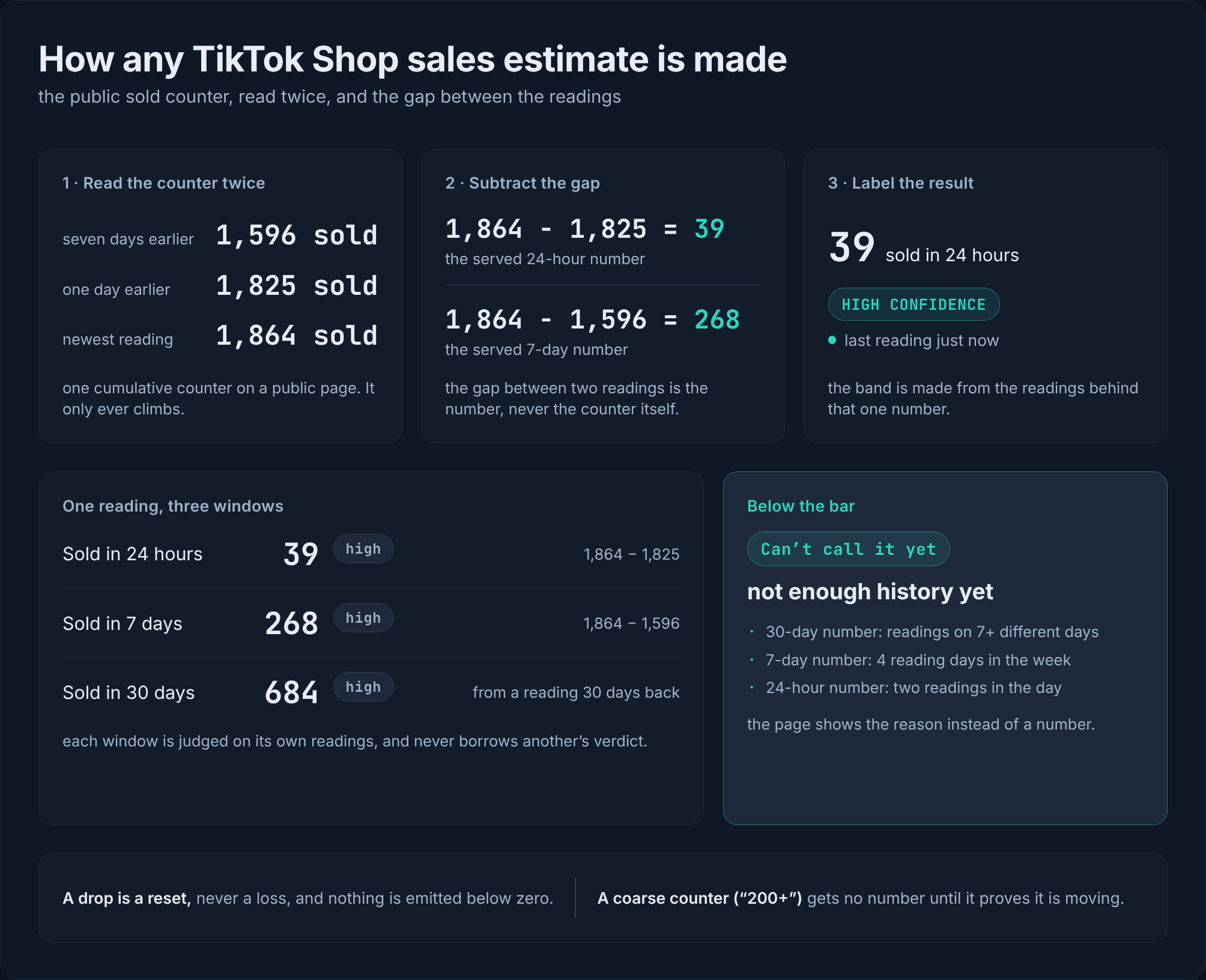
The method reads the public numbers TikTok already embeds in every product page: price, variants, and the sold-since-listing counter. It re-reads them every 6 hours on the schedule. Between two readings, it computes the change. When the change is big enough to matter, it pushes the alert to you.
That is the whole loop: re-read, compute the delta, push the alert. No portal to remember to open. No dashboard to log into. You watch the rival listing that actually threatens you, and when it moves, the alert comes to you with the readings behind it.
What the alert shows, and why that matters
Every alert shows the exact readings behind the call. You see the sold count at each dated reading, the price at each reading, and the freshness stamp on the newest one. That tells you not just that something moved, but what moved, when it moved, and how much it moved.
The point is response time. Instead of discovering the move in your own sales dip a week later, you see it the moment it crosses your alert rule. You can respond in minutes instead of weeks, because the receipts are already in front of you.
What the method cannot say yet
One honest limit. If a listing has fewer than about 7 days of history, the tool says "not enough data yet" instead of guessing. No made-up numbers. The method admits what it cannot know, and the label on the reading tells you so. You always know which numbers to act on and which to wait for.
How to read an alert for your own response
Open the alert and look at three things: the sold count at each reading, the price at each reading, and the pace of change between them.
A listing with a dropping price and a rising sold count may be clearing stock. A listing with a steady price and a rising sold count is a safer bet for a real shift. The post does not make that decision for you. The alert gives you the receipts, and you decide what they mean for your own pricing and stock.
The method behind the numbers
The re-read method is read-only. Public pages only. Never your seller login. Never a write to your shop. Least-privilege browser access, so the tool sees the same page you would see if you opened it in your browser.
The full method, including the windows, the confidence labels, and the alert rules, is on the methodology page. I keep this section short because the one limit that changes what you see on an alert is already in the section above. If you want the exact definitions of every label, that page has them.
Start tracking your rivals today
The whole step: open any TikTok Shop listing, whether it is a competitor's or your own, and add it to your watchlist. Free early access, no card, no billing in the app today. It is read-only, public pages only, no seller login, least-privilege browser access, and nothing in your shop changes.
When a watched listing moves, the alert comes with the exact readings behind the call. You do not check a dashboard. You do not open a spreadsheet. The change comes to you, with the receipts, so you can act while the move is still fresh.
I will not promise it stays free forever, and I will not name a date for when paid plans land. Neither is decided. What is decided is the method: re-read the public numbers, compute the change, push the alert, show the receipts.
Questions
- How do TikTok sales trackers work?
- They re-read the public numbers TikTok embeds in every product page (price, variants, and the sold-since-listing counter) on a schedule, compute the change between readings, and push an alert the moment the listing moves.
- What does the alert show?
- The alert shows the exact readings behind the call: the sold count at each dated reading, the price at each reading, and the freshness stamp. You can see what moved and why.
- How often are the numbers re-read?
- Every 6 hours. This is the re-read schedule that makes change measurable rather than guessed.
- What happens when the history is too thin?
- If a listing has fewer than about 7 days of history, the tool says "not enough data yet" instead of guessing. No made-up numbers.
- Is this a comparison with other tools?
- No. The post argues from the seller's situation: you want to know when a rival listing moves, and this method shows the receipts behind every alert.