How do TikTok sales trackers work: the re-read method, explained
How TikTok sales trackers work: re-read the public numbers on a listing, compute the change, and push an alert the moment it moves. Every alert shows the exact readings behind the call.
Published · 6 min read

In short
How TikTok sales trackers work: re-read the public numbers on a listing, compute the change, and push an alert the moment it moves. Every alert shows the exact readings behind the call, so you know what moved, when it moved, and how much it moved. Where the history is too thin, the tool says "not enough data yet" instead of guessing.
You can track TikTok Shop sales on any listing by re-reading the public numbers TikTok already embeds in the page, computing the change, and getting an alert the moment the listing moves. Every alert shows the exact readings behind the call, so you know what moved, when it moved, and how much it moved, without opening a dashboard. Most sellers learn about a rival's price cut from their own sales dip, weeks after the move happened. That is how TikTok sales trackers work: re-read the public numbers, compute the delta, and push the alert, so the change comes to you first. That is the short answer to how do TikTok sales trackers work.
I built SoldCount on that method. It reads the public numbers TikTok already embeds in every product page: price, variants, and the "sold since listing" counter. It takes a reading about every 6 hours, subtracts the previous reading from the newest one, and the change is something you can measure rather than guess. The full method, the windows, and the labels are on the methodology page.
Why you learn about a rival's move from your own sales dip
Sellers track rivals by hand, in a spreadsheet, or not at all. TikTok's Seller Center shows only your own shop, and there is no public product API that hands you a competitor's sales. So you open a rival's product page, note the sold counter, close the tab, and hope you remember to check back.
The tools you may already know, Kalodata and FastMoss, work as portals. You open a dashboard, search for a listing, check the numbers, close the tab. The onus is on you to remember to go back. Most sellers do not. They check on a Tuesday, see nothing, and do not think about it again until Friday.
The cost of that gap is the one in the first paragraph: you learn about a rival's price cut from your own sales dip, weeks after the move happened. The window to respond is short, and a late response is expensive. By the time your numbers dip and you work backward to figure out why, the move is already weeks old.
How the re-read method works
The re-read method is the opposite of the portal model. You do not open a dashboard. You do not remember to check back. The tool does the checking for you.
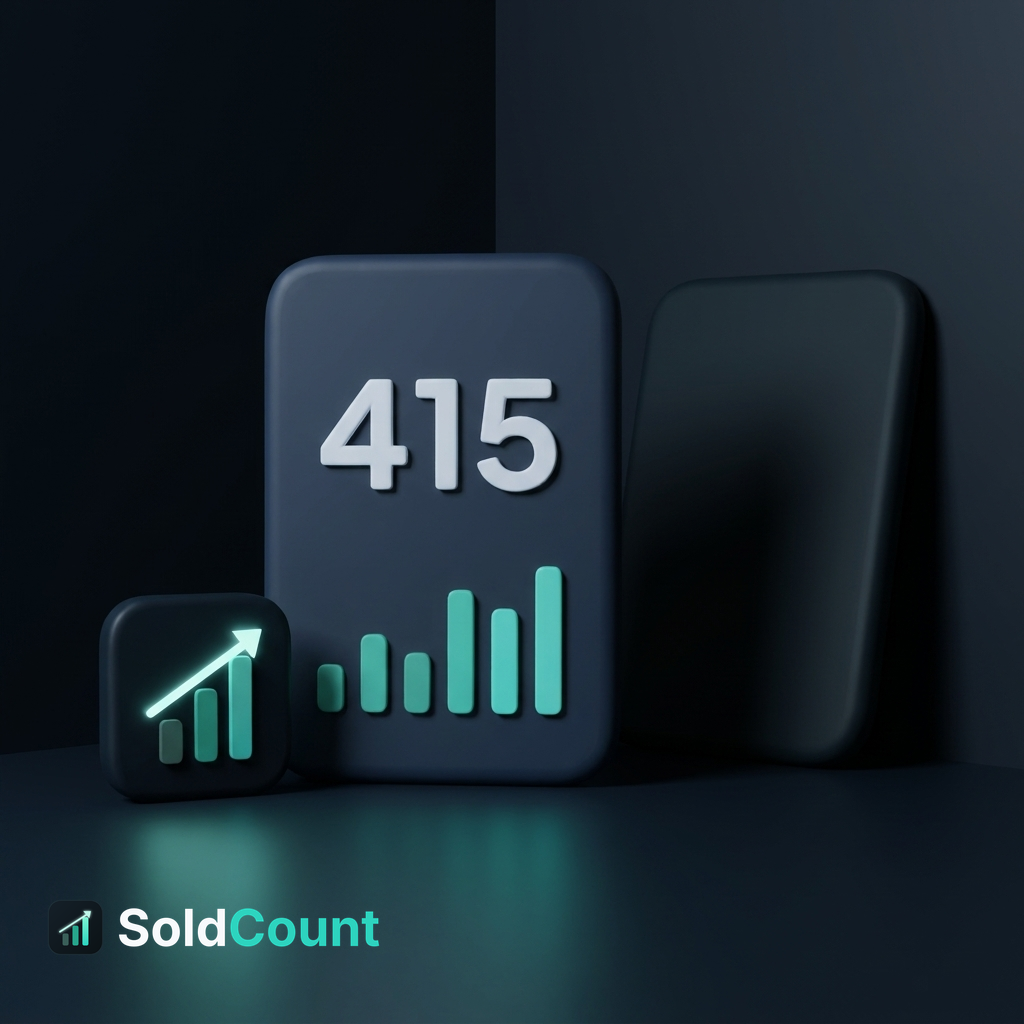
Here is the loop:
- The tool reads the public numbers TikTok already embeds in the product page: price, variants, and the "sold since listing" counter.
- It takes a reading about every 6 hours.
- It subtracts the previous reading from the newest one. The difference is how fast the listing is selling.
- When the change clears the bar you set for an alert, the tool pushes it to you.
That is the whole method. No model, no estimate, no third-party data. The sold counter is a number TikTok puts on the page. The tool reads it, reads it again, and tells you the difference.
The re-read schedule, about every 6 hours, is what makes change measurable rather than guessed. One reading tells you a number. Two readings tell you a change. The more readings, the steadier the picture.
What the alert shows, and why that matters
When a watched listing moves, the alert is not a single number. It carries the exact readings behind the call.
You see the sold count at each dated reading. You see the price at each reading. You see the freshness stamp on each one. The alert tells you not just that something moved, but what moved, when it moved, and how much it moved.
That is the difference from a portal. In a portal, you see a current number and have to remember what it was the last time you checked. In the alert, the history is in front of you. You do not have to reconstruct the change. You read it.
The full method, including how the windows and confidence labels work, is spelled out on the methodology page. I will not repeat it here. The point of the alert is simple: you get the receipts with the call, so you can act on what you are looking at.
What the method cannot say yet
One honest line, and it matters.
If a listing has fewer than about 7 days of history, the tool says "not enough data yet" instead of guessing. No made-up number. No confident-sounding figure built on two data points.
This is not a limitation I would rather not mention. It is the method working as intended. A tool that hands you a number it cannot back up is worse than one that says "I do not have enough yet." The moment the history crosses the line, the number appears. Until then, you know the tool is not guessing, and that is worth something.
How to read an alert for your own response
The alert gives you the receipts. You make the call.
When you open an alert, look at three things:
- The sold count at each reading. Is it climbing, steady, or flat?
- The price at each reading. Is it dropping, holding, or rising?
- The pace of change across the readings. Is the climb accelerating or settling?
A listing with a dropping price and a rising sold count may be clearing stock. That is a signal, not a verdict. A listing with a steady price and a rising sold count is a different story. A listing with a flat sold count and a steady price may be doing nothing at all.
I do not make the decision for you. The alert is the evidence. You are the one who knows your margin, your stock, your timing. The tool hands you the readings and gets out of the way.
The method behind the numbers
The re-read method is read-only. It reads public pages only. It never uses your seller login. It never writes to your shop. The browser access is least-privilege: it can read a page, it cannot change one.
The full method, including the sold windows, the confidence labels, and the rules for when a number appears and when it does not, is on the methodology page. I will not re-explain it here. What matters for this post is the shape of the method: public numbers, repeated readings, computed change, pushed alert.
Start tracking your rivals today
The whole step is one click. Open any TikTok Shop listing, the one from a rival that keeps you up at night, and add it to your watchlist. That is it.
It is free early access. No card. No billing in the app today. It is read-only, public pages only, no seller login, and nothing in your shop changes. When a watched listing moves, the alert comes to you with the exact readings behind the call.
I will not promise it stays free forever, and I will not name a date for paid plans. Neither is decided yet. What is decided is the method, and the method is the one above.
Questions
- How do TikTok sales trackers work?
- They re-read the public numbers TikTok embeds in every product page (price, variants, and the sold-since-listing counter) on a schedule, compute the change between readings, and push an alert the moment the listing moves.
- What does the alert show?
- The alert shows the exact readings behind the call: the sold count at each dated reading, the price at each reading, and the freshness stamp. You can see what moved and why.
- How often are the numbers re-read?
- Every 6 hours. This is the re-read schedule that makes change measurable rather than guessed.
- What happens when the history is too thin?
- If a listing has fewer than about 7 days of history, the tool says "not enough data yet" instead of guessing. No made-up numbers.
- Is this a comparison with other tools?
- No. The post argues from the seller's situation: you want to know when a rival listing moves, and this method shows the receipts behind every alert.